
How to Choose the Right RGB To CMYK Conversion Tool for Your Printing Needs
In the world of professional design and printing, color accuracy can make or break your visual communication. Whether you’re designing packaging, marketing materials, or product labels, ensuring that the colors on your screen match what comes out of the printer is critical. One of the biggest hurdles in achieving this consistency is understanding the difference between RGB and CMYK color models, and using the right RGB To CMYK Conversion Tools to bridge that gap.
The Difference Between RGB and CMYK
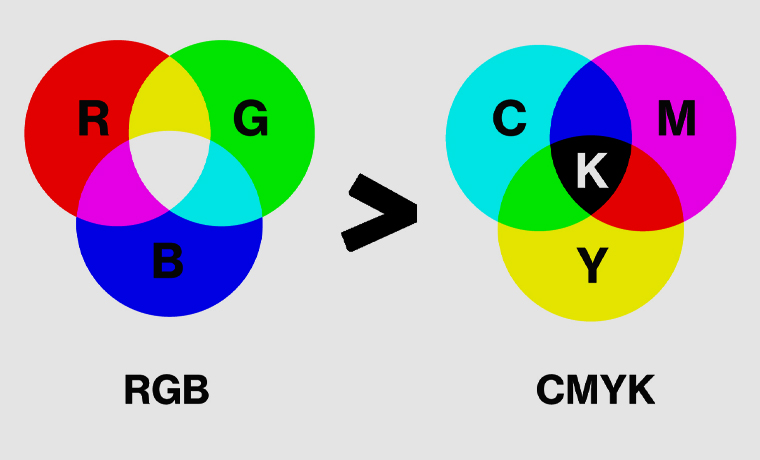
Before diving into conversion tools, it’s essential to understand what you’re converting. RGB (Red, Green, Blue) is the color model used for digital displays. It’s ideal for screens because it relies on light to mix colors and achieve vibrancy. On the other hand, CMYK (Cyan, Magenta, Yellow, and Key/Black) is used in physical printing. This subtractive color model combines inks to create a range of hues and is optimized for various paper types and finishes.
While these two systems may visually look similar on screen, converting from RGB to CMYK often results in subtle or dramatic shifts in color. This is why choosing the correct RGB To CMYK Conversion Tools is crucial for print-ready results.
Why Accurate Color Conversion Matters in Printing
Using a reliable converter ensures that what you design is what your customer receives. Mismanaged conversions can lead to washed-out tones, overly dark visuals, or even clashing colors that affect brand identity. Imagine a packaging box designed in a rich royal blue only to find it printed in a dull navy shade, this disconnect undermines the product’s appeal and brand integrity.
This is particularly important for industries like product packaging, where vibrant, accurate colors help differentiate products on shelves. Having precise CMYK-ready files ensures smoother collaboration with commercial printers and helps avoid costly reprints or dissatisfaction.
Features to Look for in RGB to CMYK Conversion Software
Not all conversion tools are created equal. Here are some features to look for when choosing color conversion software:
- Color Profile Support: Good tools let you choose or upload specific CMYK color profiles that align with your printer’s requirements (like ISO Coated v2 or US Web Coated SWOP).
- Live Previews: Visual previews help you compare the RGB and CMYK versions side-by-side before finalizing your design.
- Batch Conversion: Essential for converting multiple files efficiently, especially for large packaging or catalog projects.
- Adjustment Tools: Ability to fine-tune color balance or individual channels during or after conversion.
- File Format Compatibility: Ensure the tool supports common formats like .AI, .EPS, .PDF, and .PSD used in design workflows. See more
Top Free and Paid RGB to CMYK Conversion Tools
There are various tools available from simple online utilities to professional-grade software. Below are some of the best online RGB to CMYK converters and software options for every budget:
1. Adobe Photoshop & Illustrator
Adobe’s Creative Cloud tools are industry standards. Both programs allow designers to convert RGB to CMYK by changing color modes, with support for ICC profiles and detailed previews. While it comes with a subscription cost, the professional-level control is unmatched.
2. GIMP
A powerful free alternative to Photoshop, GIMP offers CMYK plug-ins and color separation capabilities. With a bit of setup, it becomes a strong tool for basic color conversion software needs.
3. RGB2CMYK.org
This is one of the most straightforward free tools to convert RGB to CMYK online. Simply upload your image and download the CMYK version. It’s not ideal for advanced needs, but great for quick conversions.
4. Canva Pro
Though primarily a design platform, Canva Pro now allows file export in CMYK mode for certain formats. This feature makes it convenient for small business owners designing labels, flyers, or product packaging without complex software.
5. Zamzar and Convert.io
These tools specialize in format conversion but also support basic color transformations. They’re good for bulk or one-off conversions, although they may lack in color profile customization.
How to Convert Correctly: Step-by-Step Overview
Here’s a basic step-by-step guide you can follow regardless of the platform you use:
- Create Your Design in RGB – Most digital tools start in RGB by default. It allows vibrant design creation.
- Switch to CMYK Before Final Output – Convert your file to CMYK before printing. In Adobe Illustrator, this means navigating to File > Document Color Mode > CMYK.
- Check Color Accuracy – Review your design after conversion. Use eyedropper tools or previews to ensure color fidelity.
- Adjust and Export – Modify colors if needed and export in print-ready formats like PDF or TIFF with CMYK profiles embedded.
Avoiding Color Shift Pitfalls
One of the most frustrating parts of this process is RGB to CMYK color shift, where vibrant screen colors look dull or off in print. This is common with neon tones, highly saturated reds, and certain blues. Good tools will warn you of out-of-gamut colors and allow you to adjust them manually.
Tips to reduce color shift include:
- Use Pantone color guides as a reference.
- Choose CMYK-safe colors during the initial design phase.
- Request color proofs from printers before running a large print job.
Role of Conversion Tools in Packaging Design
For companies like product packaging, proper use of RGB to CMYK tools ensures a brand’s visual identity is consistent across all materials from digital ads to printed packaging. Whether designing a cereal box or a cosmetics label, color accuracy builds professionalism and trust with customers.
Especially in eCommerce and retail, packaging acts as a first impression. Having pixel-perfect, print-perfect colors through smart conversion tools can greatly impact sales and brand perception.
Conclusion
Choosing the right RGB To CMYK Conversion Tools isn’t just a technical step—it’s a vital part of ensuring quality, professionalism, and consistency in print design. From free converters to advanced creative software, the options vary based on your needs and budget. Always preview, adjust, and export carefully to avoid any print surprises.
When your packaging design matters, and it always does, investing in proper tools for color conversion is non-negotiable. With the right preparation, you can confidently take your digital designs into the real world without compromising visual impact.
Designed by 4jsdesigns.com
